LLMs and shaders #
In the last post I described how chat interfaces to LLMs are giving a limited view of what the LLMs could do. In this post I wanted to compare this to graphics pipelines.
Graphics pipelines used to be "fixed function", where the graphics system (such as Silicon Graphics hardware) would offer you the graphics features:
- you always got a matrix multiply (translate, scale, rotate, perspective, etc.)
- you always got gouraud shading
- you always got their standard lighting model (ambient, diffuse, specular, emission, shininess)
- you got to choose up to 8 lights with glLight() with a handful of styles
- you always got a color per object, but later they offered a texture lookup
- you got to control the fog level with glFog() (density, color, etc.)
But what if you wanted a different model like phong shading? Too bad! What if you wanted any effect other than fog? Too bad! What if you wanted more than 8 lights? Too bad! What if you wanted 2 textures? Too bad! At least until they added a feature to enable a second texture lookup. If you wanted anything else, you needed to implement your own graphics pipeline and give up on hardware acceleration.
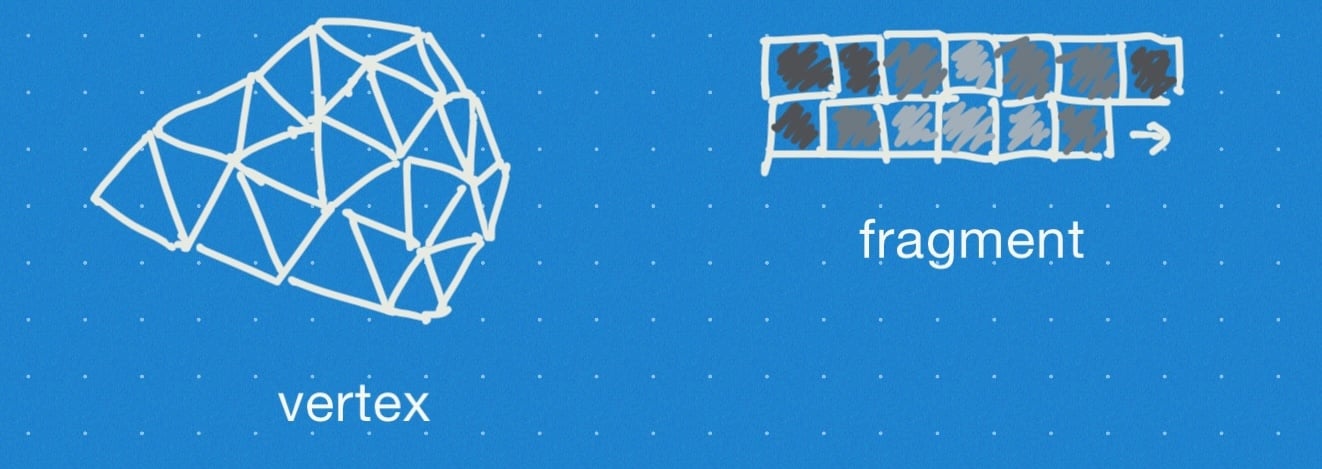
Over time, these fixed features were replaced by "shaders". The vertex shader would handle the overall structure with matrix multiply, clipping, fog, colors. Once we could control it, people came up with cloth, grass, water, terrain, animation, procedural geometry, and lots of other things. The fragment shader would handle fine details with texture lookup and lighting. Once we could control it, people came up with custom lighting, organic textures, animation, procedural art, and lots of other things.
Labels: speculation, structure
LLMs: screenwriters vs characters #
I often see someone say "the AI said XYZ" but my understanding is that what an LLM like ChatGPT shows us is not the the LLM answering, but something slightly different. I am going to post my current understanding, with the expectation that my readers will correct me (xkcd 386 and/or Cunningham's Law).
When we chat with an LLM, we might see something like:
User: Hello. My name is John. Assistant: Hello John.
I think it's useful to separate the different parts of the system here. The underlying LLM ("foundational model") does completion. It predicts the next word/token given a sequence:
User: Hello. My name is John. Assistant: Hello
User: Hello. My name is John. Assistant: Hello John
User: Hello. My name is John. Assistant: Hello John .
[Note for those of you reading in an RSS reader: I'm distinguishing my input from the LLM's output, and some RSS readers may not show the different formatting.]
Labels: structure
Status codes like TODO #
I often put TODO comments into my projects, including in source code. And I'll change it to DONE afterwards. I ended up keeping a list of four-letter codes:

Labels: structure
Tags vs labels #
In online collections (photos, bookmarks, blog posts, emails, etc.), “labels” and “tags” are typically words attached to the content. For example I have a photo of a hummingbird on which I used the labels hummingbird (what it is) and coyote hills (where it was). These words are non-hierarchical, unlike “categories” or “folders”.
But are “labels” and “tags” the same thing?
A long time ago, I read that they're different. The distinction as described was:
- “labels” are when you mark your own content (first party)
- “tags” are when you mark other people's content (third party)
This matches the behavior I see in other contexts:
- the “label” on a t-shirt is what the manufacturer (first party) put on, while the “price tag” is what the store (third party) put on
- in emacs and vi, there's a "tags" program that creates a mapping of words to source code, but it's attached by a third party (the tags program), not by the author of the source code
- a “car label” is put on by the manufacturer (first party), while a “car tag” in the U.S. is given out by the state vehicle registration agency (third party)
- “tagging” is graffiti, most often put on someone else's building
- web servers have an “etag” which is attached to content not created by the web server itself, so that makes it a third party addition
But I think the distinction isn't clear. For example, Flickr uses “tags” when you mark your own content, but also “tags” when you annotate other people's content and also “tags” when the algorithms mark content automatically. And Gmail uses “labels” for your own emails, but also for other people's emails. Maybe this distinction is not relevant anymore.
Separately, “hashtags” are something that started on Twitter. They're tags, but using the # symbol. This is different from “channels” on IRC, where topics are named #dogs, #cats, etc. Slack and Discord get the # channel names from IRC. Twitter's use is different from channels. Instagram, YouTube, and other sites also have hashtags like Twitter.
(I wanted to write this down as a reference for myself, the next time I'm wondering about tags vs labels.)
Labels: structure
Sizes of coins and bills #
In the U.S. we have 1¢ 5¢ 10¢ 25¢ 50¢ coins. We have $1 $2 $5 $10 $20 $50 $100 bills. The EU has 1c 2c 5c 10c 20c 50c €1 €2 for coins and €5 €10 €20 €50 €100 €200 €500 for bills.
I think there are too many types. I don't use 10¢, 50¢ coins, nor do I use $2 $10 $50 bills. Why?
I think what I want is for each size to be 4 or 5 times as big as the previous size. My simplicity-preferring brain doesn't like to see a $2 bill when two $1 bills is not that much more to carry. I don't like to use a $10 bill instead of two $5 bills. Carrying five $1 bills is a bit much and then I'm happy to carry a $5 bill instead. Two or three isn't enough to trigger this desire; four or five is enough.
If we started with 1¢ and stepped up by a factor of 4 or 5 each time, then the sequence would be 1¢ 5¢ 25¢ $1 $5 $20 $100. These are the ones I actually use in practice. For Euros we could have 1c 5c 20c €1 €5 €20 €100 €500.
Let's drop 10¢ coins and $10 bills and treat them like 50¢ coins, $2 bills, $50 bills — they exist but we don't use them widely.
Labels: structure
3D Printer Printers #
We have 3D printers that can take a description and print an object. Some 3D printers are capable of printing everything needed to make another 3D printer.

This reminds me of programming language implementations.
An interpreter takes a description (a program) and prints some output. A meta-circular interpreter is an interpreter written in the same language that it inteprets.

With programming languages we also have compilers that translate a program into another program that does the same thing but better (smaller and faster).

What's the equivalent for 3D printers? I think it'd be a 3D printer that prints another, more specialized printer. That specialized printer might work faster or produce higher quality output or work with materials that a general-purpose 3D printer can't work with.

The analogy isn't perfect but I'd like to see 3D printers that print more specialized printers.
Labels: speculation, structure
Unstructured to Structured #
I find that I often don’t know a structure or abstraction until I’ve worked with something more concrete. This happens in programming but it also happens when creating structured information.
While helping Wild Shadow Studios with Realm of the Mad God, we held our discussions in Google Wave for two years, until Google shut it down. Why did we use a tool everyone else thought was useless?
- Group Chat: The 3–6 of us could chat about the game.
- Asynchronous: We could continue conversations while not all of us were online.
- Nesting: We could reply to individual points made in another message.
- Attachments: We shared test binaries or screenshots.
It was nice for keeping everyone “on the same page”.
Wave didn’t work well for us when it came to adding structure. We had thousands of chat messages in the system, but when a bug or feature or idea came up, there wasn’t an easy way to transition into a task tracker. As a result, those kinds of things were too easily forgotten.
When I use tools like Asana or Trello or Cohuman, they want me to start with structured data, but they don’t handle the informal unstructured nature of IM or Wave. Where do those tasks come from? They came from somewhere, but that history isn’t preserved when you create a new task in a task tracking tool.
I want a tool that lets me hold unstructured conversations, then extract portions of conversations that led to a task, and move them into my task tracking tool. Unstructured comes first for me; structure is what I add later, once I understand what structure I want. Databases and most structured tools I use get this wrong — they ask me to decide the structure first. Spreadsheets, Wikis, Wave, and most unstructured tools also get this wrong — they let me easily work without structure, but don’t offer me a transition to something structured. JotSpot, before it was bought by Google, is the only tool I tried that had a smooth transition from unstructured to structured.
It’s also possible I’m cursed to like things that have a lot of potential, but can’t be understood in five minutes, and thus are doomed to niche status. I think Wave and JotSpot both fit into this category.
Labels: structure
iPhone vs. gPhone navigation model #
I've had an iPhone for a long time. I tried a G1 “gPhone” and thought it was slow and unpolished (I've heard Cyanogen's mod helps a lot with the speed), so I went back to my iPhone. But after trying out the G1 for a bit longer, I've discovered the model is quite different, and possibly better, than the iPhone's model. Here are some scenarios:
Labels: structure
Fun with user styles #
Long ago (1997), Internet Explorer 4 gave us user style sheets, in the accessibility options. You could point the browser at your CSS file, and it would merge the user styles with the author styles. As with many features in IE4, other browsers adopted this feature too (Mozilla in 2002, Opera in 2003, I think).
User styles are quite neat. However, having to edit a file somewhere and then reload the browser is sort of a pain. The Stylish addon for Firefox makes user styles much easier:
- You can edit the styles per site instead of globally.
- You can organize your CSS into named sections.
- You can share these sections with others.
- You can browse userstyles.org to find CSS shared by others.
- You can install user styles from others with just a few clicks.
I just keep forgetting to write my own styles. Tonight I got fed up with MyWay's 700-pixel fixed width TV listings:

I used Firebug to look at the structure of the site, and after navigating nested tables with no class or id names to hang my CSS onto, I decided to use CSS attribute selectors to address the two tables that I wanted:
@-moz-document domain("tv.myway.com") {
  table[width="700"] {
    width: 100% ! important;
  }

  table[bgcolor="888888"] {
    background-color: #fff ! important;
    padding: 2px;
  }

  table[bgcolor="888888"] td {
    border: 1px solid #bbb;
    font-family: tahoma ! important;
    font-size: small ! important;
    -moz-box-shadow: 1px 1px 2px #bbb;
  }

  table[bgcolor="888888"] td a {
    font-weight: bold;
    color: #000 ! important;
    text-decoration: none ! important;
  }
}
Here's the result:

Try out user styles. If you don't know CSS, you can explore userstyles.org; if you do, you can also try writing your own.
Feeds are not enough #
There are lots of types of information I want to search and browse, but it's typically information that I want to see right now. I also want to be notified about new information and changes to information. Emails, text messages, and pager alerts are ways to send this information to me. Feeds are a little different in that they're controlled by the receiver pulling information rather than the sender pushing it. All of these systems allow senders to transmit messages to receivers. However all of them treat each message separately.
What I really want is information, not a set of messages. The messages should be grouped and summarized. Gmail for example groups messages into conversations. Facebook groups and summarizes friend updates. For example instead of separately telling me, “A is a friend of D”, “B is a friend of D”, and “C is a friend of D”, Facebook will tell me “A, B, and C are friends of D”. They can do this because they know the structure, not only text, of messages, and also because they know when I last read messages.
There are lots more things I'd like to see along these lines. For example if I receive 100 messages telling me my site is down, and I'm away from my computer, I'd like them to be combined together. Or if the site is back up maybe those messages should go away, replaced by a note saying the site went down and back up. If I get a traffic alert it should expire when the traffic clears up again. If I read news every hour I want to see what's new in the past hour but if I read news once a week I want to see the week's biggest stories, not the 168 hours of updates. When I come back from vacation I shouldn't have lots of low-importance and redundant messages. Group and summarize. Show me what's important. Don't overwhelm me with every individual message.