Emacs Tree-sitter custom highlighting, part 1 #
A few years ago I blogged about custom tree-sitter-based syntax highlighting in emacs. I started out with highlighting certain keywords in red. I wanted to show the keywords that interrupt control flow:
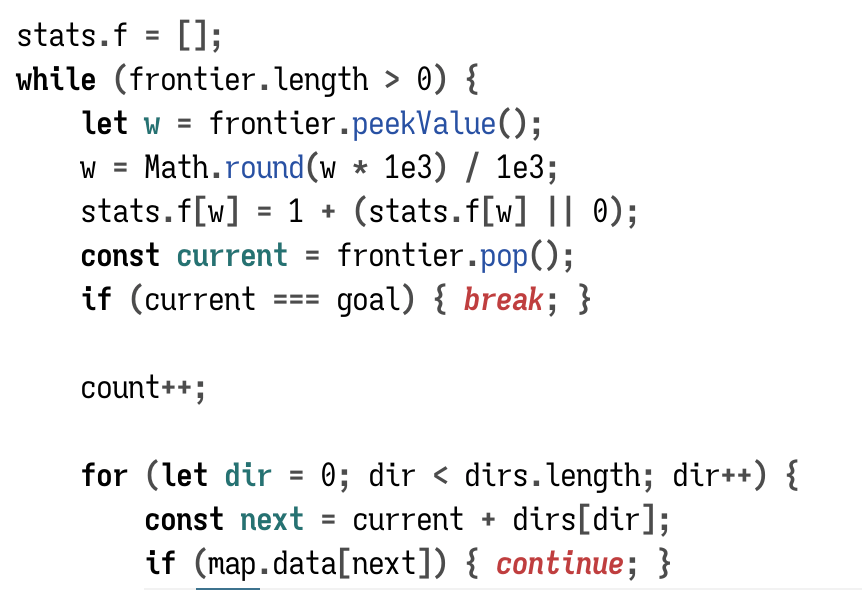
I highlight regular keywords (while, if) in bold. I highlight control flow interrupting keywords (return, continue) in red.
That's syntax highlighting.
But I also wanted to highlight names based on their meaning.
Labels: emacs
Emacs consult-buffer filenames #
When working on my web projects I often have same the same filename in different folders, such as projectname/index.html and anotherproject/index.html.
When opening files in Emacs, I might have to open index.html if I'm already in projectname/ or type ../anotherproject/index.html to open from another folder. I switch folders enough that I wanted to have a more consistent way to open things. I now use a global find-file that lets me match on the complete pathname. I can open projectname/index from anywhere, without having to type something different based on which folder I'm in.
When switching buffers, either with the built-in function or with consult-buffer from consult.el, I can type index.html if I only have one index.html file open. If I have more than one open, Emacs will rename them index.html<projectname>, index.html<anotherproject>, etc., and then I would type index projectname. But if I have only one open, then typing index projectname will fail. I wanted to make it more consistent so that I could always type index projectname whether there's only one index.html buffer open or multiple. I implemented this by putting the full filename instead of the buffer name into consult's buffer list:
Labels: emacs
Observational studies #

Wikipedia, Derek Springer, CC BY-SA 2.0
People who wear red shirts on the original Star Trek have a high mortality rate.
- can we conclude that red shirts caused the high mortality rate?
- can we solve the problem by having them yellow shirts instead?
Labels: health
Status codes like TODO #
I often put TODO comments into my projects, including in source code. And I'll change it to DONE afterwards. I ended up keeping a list of four-letter codes:

Labels: structure
Using an LLM to query my notes #
robot asks a question holding a book" image from stable diffusionI occasionally play with LLMs (large language models). Last time I had tried Simon Willison's llm software to search over my notes. Today I tried amaiya/onprem to ask questions about my notes. The documentation is pretty good but I made a few changes for my configuration, so I decided to write them down here. I'm running these on my Mac M1 and not on my Linux or Windows machines.
First step, get the thing installed:
cd ~/Projects/machine-learning/
mkdir onprem
cd onprem

# need to use python 3.9 through 3.11 for torch support; 3.12 doesn't support it yet
# check the version I have installed
python3 --version
# if python3 isn't a reasonable version, then install or choose a different python
# before doing the next step

python3.11 -m venv venv
source venv/bin/activate

# install onprem itself, which also installs torch
pip install onprem
mkdir data
Labels: howto