LLMs and shaders #
In the last post I described how chat interfaces to LLMs are giving a limited view of what the LLMs could do. In this post I wanted to compare this to graphics pipelines.
Graphics pipelines used to be "fixed function", where the graphics system (such as Silicon Graphics hardware) would offer you the graphics features:
- you always got a matrix multiply (translate, scale, rotate, perspective, etc.)
- you always got gouraud shading
- you always got their standard lighting model (ambient, diffuse, specular, emission, shininess)
- you got to choose up to 8 lights with glLight() with a handful of styles
- you always got a color per object, but later they offered a texture lookup
- you got to control the fog level with glFog() (density, color, etc.)
But what if you wanted a different model like phong shading? Too bad! What if you wanted any effect other than fog? Too bad! What if you wanted more than 8 lights? Too bad! What if you wanted 2 textures? Too bad! At least until they added a feature to enable a second texture lookup. If you wanted anything else, you needed to implement your own graphics pipeline and give up on hardware acceleration.
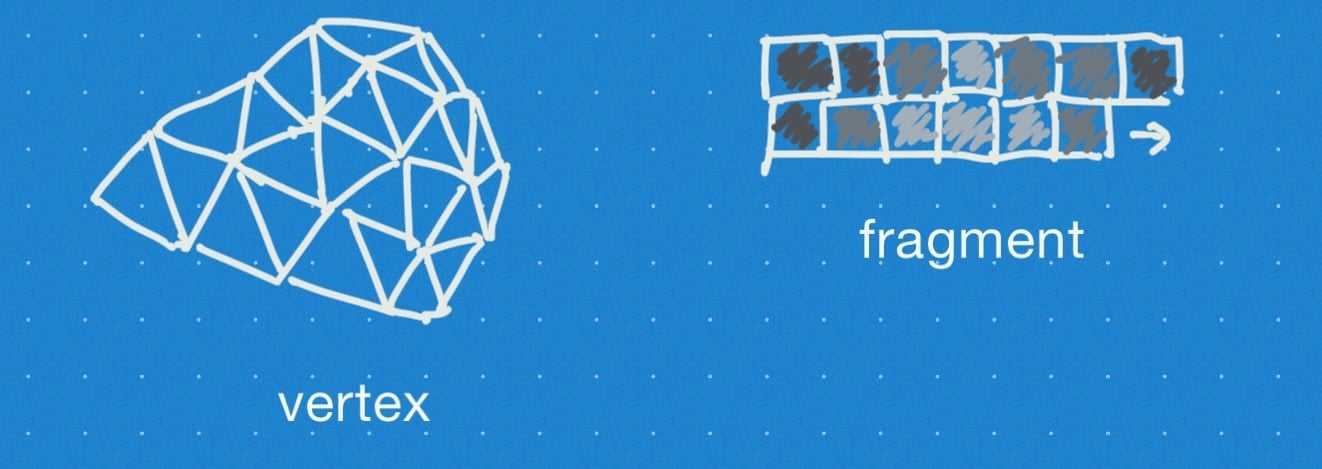
Over time, these fixed features were replaced by "shaders". The vertex shader would handle the overall structure with matrix multiply, clipping, fog, colors. Once we could control it, people came up with cloth, grass, water, terrain, animation, procedural geometry, and lots of other things. The fragment shader would handle fine details with texture lookup and lighting. Once we could control it, people came up with custom lighting, organic textures, animation, procedural art, and lots of other things.
Labels: speculation, structure
LLMs: screenwriters vs characters #
I often see someone say "the AI said XYZ" but my understanding is that what an LLM like ChatGPT shows us is not the the LLM answering, but something slightly different. I am going to post my current understanding, with the expectation that my readers will correct me (xkcd 386 and/or Cunningham's Law).
When we chat with an LLM, we might see something like:
User: Hello. My name is John. Assistant: Hello John.
I think it's useful to separate the different parts of the system here. The underlying LLM ("foundational model") does completion. It predicts the next word/token given a sequence:
User: Hello. My name is John. Assistant: Hello
User: Hello. My name is John. Assistant: Hello John
User: Hello. My name is John. Assistant: Hello John .
[Note for those of you reading in an RSS reader: I'm distinguishing my input from the LLM's output, and some RSS readers may not show the different formatting.]
Labels: structure
Emacs per-project colors #
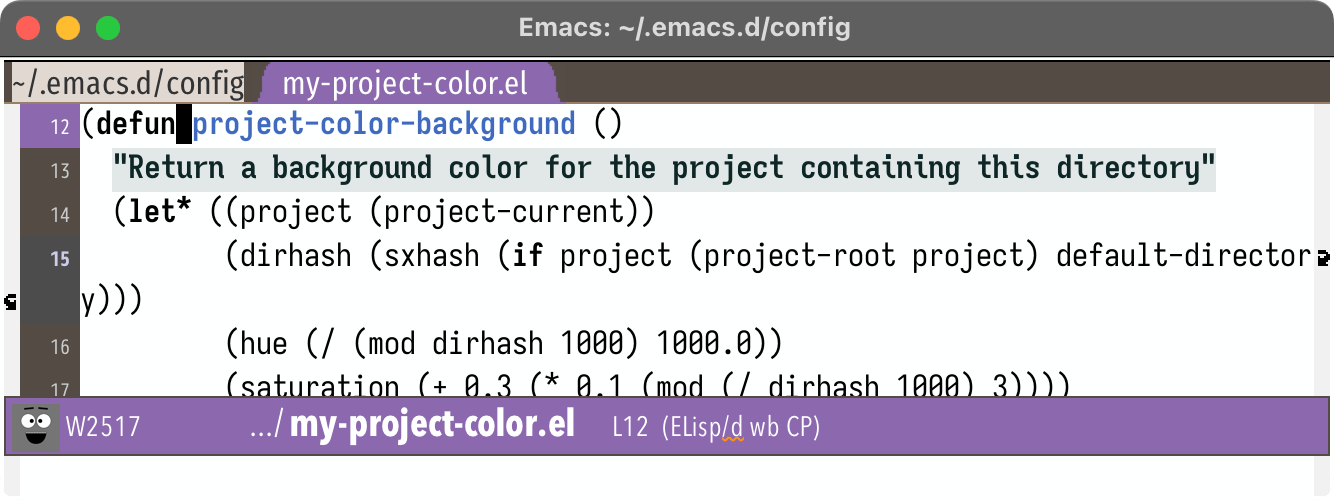
For several years now I've been using color in my Emacs buffers to mark whether it's a "work" project or a "personal" project. I think I first showed this in a blog post I wrote in 2017, when I had switched to spaceline's mode line. Since then I've extended that color to also work on the tab line, current line, and header line. I wanted to make it work with the cursor color but couldn't figure that out.
I saw a question on stack exchange today that made me realize I could extend this to have one color per project, similar to how rainbow-identifiers works.
Labels: emacs
Emacs Tree-sitter custom highlighting, part 3 #
In the part 2 I described how, for a particular project with certain naming conventions, I wanted to use emacs tree-sitter font-locking to highlight variables that might be used in the wrong context:
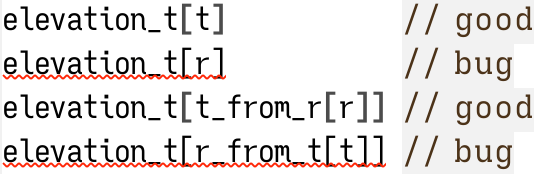
I found a way to make it work for simple expressions but it was relying on regular expression matching rather than tree-sitter parse trees. I set a goal of handling these types of expressions:
elevation_t[t]           // good
elevation_t[r]           // bug
elevation_t[t_from_r[r]] // good
elevation_t[r_from_t[t]] // bug
elevation_t[obj.t]       // good
elevation_t[obj.r]       // bug
elevation_t[t_from_r(r)] // good
elevation_t[r_from_t(t)] // bug
elevation_t[x.t_fn(x)]   // good
elevation_t[x.r_fn(x)]   // bug
elevation_t[x.t_arr[i]]  // good
elevation_t[x.r_arr[i]]  // bug
elevation_t[(t)]         // good
elevation_t[(r)]         // bug
Labels: emacs
Emacs Tree-sitter custom highlighting, part 2 #
In the part 1 I described my initial attempt at customizing font-lock using Emacs 29 tree-sitter. Regular font locking uses regular expression matching. Tree sitter allows combining regular expression matching with parse tree matching, like "variable declaration" or "function call". The ideas I came up with were mostly things that I could have implemented with regular expressions alone, but I wanted to experiment with the tree sitter approach. Here's the effect of conventional highlighting, using color for keywords and other syntax:


Labels: emacs
Emacs Tree-sitter custom highlighting, part 1 #
A few years ago I blogged about custom tree-sitter-based syntax highlighting in emacs. I started out with highlighting certain keywords in red. I wanted to show the keywords that interrupt control flow:
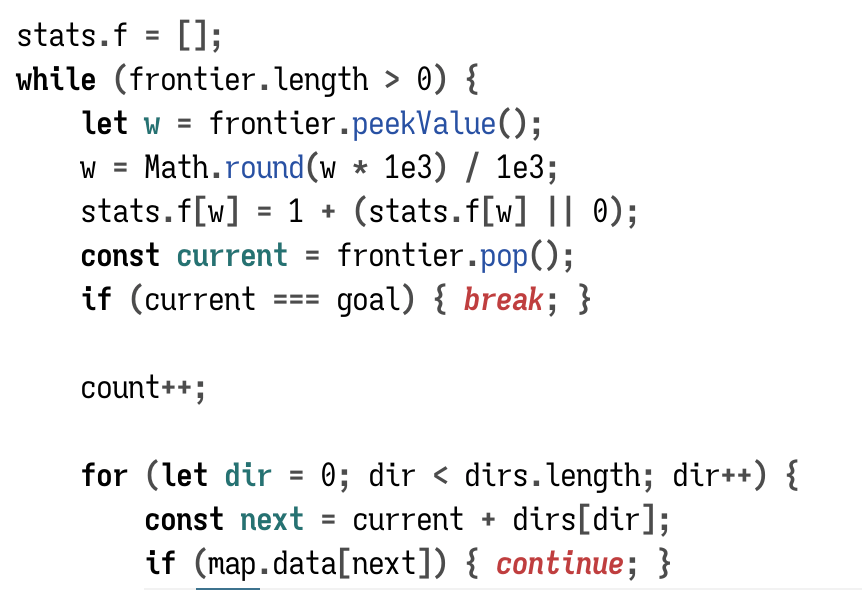
I highlight regular keywords (while, if) in bold. I highlight control flow interrupting keywords (return, continue) in red.
That's syntax highlighting.
But I also wanted to highlight names based on their meaning.
Labels: emacs
Emacs consult-buffer filenames #
When working on my web projects I often have same the same filename in different folders, such as projectname/index.html and anotherproject/index.html.
When opening files in Emacs, I might have to open index.html if I'm already in projectname/ or type ../anotherproject/index.html to open from another folder. I switch folders enough that I wanted to have a more consistent way to open things. I now use a global find-file that lets me match on the complete pathname. I can open projectname/index from anywhere, without having to type something different based on which folder I'm in.
When switching buffers, either with the built-in function or with consult-buffer from consult.el, I can type index.html if I only have one index.html file open. If I have more than one open, Emacs will rename them index.html<projectname>, index.html<anotherproject>, etc., and then I would type index projectname. But if I have only one open, then typing index projectname will fail. I wanted to make it more consistent so that I could always type index projectname whether there's only one index.html buffer open or multiple. I implemented this by putting the full filename instead of the buffer name into consult's buffer list:
Labels: emacs
Observational studies #

Wikipedia, Derek Springer, CC BY-SA 2.0
People who wear red shirts on the original Star Trek have a high mortality rate.
- can we conclude that red shirts caused the high mortality rate?
- can we solve the problem by having them yellow shirts instead?
Labels: health
Status codes like TODO #
I often put TODO comments into my projects, including in source code. And I'll change it to DONE afterwards. I ended up keeping a list of four-letter codes:

Labels: structure
Using an LLM to query my notes #
robot asks a question holding a book" image from stable diffusionI occasionally play with LLMs (large language models). Last time I had tried Simon Willison's llm software to search over my notes. Today I tried amaiya/onprem to ask questions about my notes. The documentation is pretty good but I made a few changes for my configuration, so I decided to write them down here. I'm running these on my Mac M1 and not on my Linux or Windows machines.
First step, get the thing installed:
cd ~/Projects/machine-learning/
mkdir onprem
cd onprem

# need to use python 3.9 through 3.11 for torch support; 3.12 doesn't support it yet
# check the version I have installed
python3 --version
# if python3 isn't a reasonable version, then install or choose a different python
# before doing the next step

python3.11 -m venv venv
source venv/bin/activate

# install onprem itself, which also installs torch
pip install onprem
mkdir data
Labels: howto
Emacs and shellcheck #
Julia Evans had a great talk called Making Hard Things Easy. One of the takeaways for me was that I should be using tools for parts of a system I find hard to remember. In particular, when writing bash scripts I should be using shellcheck.
It turns out Emacs 29 has support for shellcheck, and older versions of Emacs can use the flymake-shellcheck page.
To set it up in Emacs 29:
(use-package flymake
  :bind (("H-e" . flymake-show-project-diagnostics)))

(use-package sh-script
  :hook (sh-mode . flymake-mode))
I use consult for navigating my errors, and I want to make errors more noticable in the mode line, so my flymake configuration is:
(use-package flymake
  :bind (("H-e" . my/consult-flymake-project))
  :preface
  (defun my/consult-flymake-project ()
    (interactive)
    (consult-flymake t))
  :custom
  (flymake-suppress-zero-counters t)
  :config
  (defface my/flymake-modeline-error-echo
    '((t :inherit 'flymake-error-echo :background "red"))
    "Mode line flymake errors")
  (put 'flymake-error 'mode-line-face 'my/flymake-modeline-error-echo)
  (defface my/flymake-modeline-warning-echo
    '((t :inherit 'flymake-warning-echo :background "orange"))
    "Mode line flymake warnings")
  (put 'flymake-warning 'mode-line-face 'my/flymake-modeline-warning-echo))
It's too early to know what other tweaks I might want, but so far it's alerted me to several errors in my shell scripts.
Update: [2023-10-07] Comments on HN pointed to bash-language-server which works with emacs lsp or eglot.
Labels: emacs
Road Archaeology, part 2 #
In a previous post I showed some examples of how railroads influenced the shape of Interstate 5 in California. In this post I have some more examples of what I call "road archaeology". Looking at the present roads, we can make guesses about the past.
In Las Vegas the major casinos are along "The Strip". Just to the west of this is the interstate highway, I-15. What is the history here? My guess, following the patterns from the previous blog post, would be that "The Strip" was the original highway, and I-15 was built parallel to it. If you look through Historial Aerials you can see that this is indeed what happened. Here's the interactive map to browse:
Labels: transportation
Mac keyboard with hidutil #
[Update: 13-Apr-2023 with some of the background context and some things I learned from hackernews]
[Update: 18-Dec-2023] This hidutil stopped working for me in MacOS 13.6 and 14.2. Also see other people having problems too.
[Update: 28-Jan-2024] Some people say hidutil works again in Mac OS 14.3.
On my Mac, I've used KeyRemap4Macbook, Karabiner, Karabiner Elements, and FunctionFlip for some of my key remapping needs. The main things I want:
- On the laptop keyboard, some media keys should be function keys but other media keys should stay media keys. When using fn I want to get the other version of the key.
- On external keyboards, make the function keys act like the laptop keyboard.
- On external keyboards, the numpad should act like "numlock off". For example, 4 should be Left Arrow.
- On external keyboards, the Windows key should act as Option, and the Alt key should act as Command. This can usually be set in the System Preferences. (Except it doesn't work on one of my keyboards)
- I also use those same external keyboards with my Windows and Linux machines, so I prefer to make these changes through software rather than firmware.
Road Archaeology, part 1 #
While on road trips I notice sometimes there are places where a road will deviate from the path I expect it to take. I take a note of it and then investigate what happened there. Usually there's some geography or history involved. Take I-5 in Northern California for example. There's a straight segment from Dunnigan CA to Williams CA:
Labels: transportation
Emacs: marking text #
Although I primarily use Emacs, I love the idea of vim text objects, and wanted to incorporate them into my editing. The Kakoune introduction explains that vim uses verb first, noun second for its commands, whereas Kakoune uses noun first, verb second. I wrote a blog post about why I prefer noun-verb over verb-noun, not only in text editors but also in games and other applications.
Labels: emacs
Axial name highlighting #
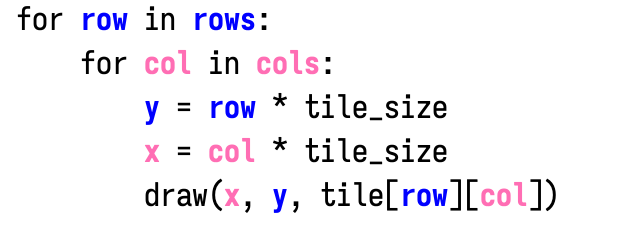
I like to try various things out in my editor to see if they're useful. Most are interesting but not useful. On my guide to hexagons I use colors for the three hexagon axes (q, r, s). I thought it might be cool to do something similar in the text editor, for x and y:
Labels: emacs, programming
Beer mode and coffee mode #
Over the years I've mentioned to people that I work in two modes:
- Beer Mode 🍺
- I'm relaxed and make connections between many different ideas. I can come up with new creative ideas.
- Coffee Mode ☕
- I'm focused and make progress on my work. I am productive and can complete existing projects.
I assumed that the names "Beer Mode" and "Coffee Mode" are something I saw somewhere. But then when I went looking for it, I couldn't find any source. It seems to be called "open mode" and "closed mode" by others. So it's possible that these terms are something I came up with! I mentioned it in 2021 on Twitter and David Perell wrote a page about it.
I had a similar experience when I said Dreams are malleable — I assumed I had seen this somewhere but I couldn't find a good source, so it's possible my brain came up with that phrase too. And also possibly this one. I say lots of off-the-cuff things (in beer mode) and don't remember most of them.
Non-consensual personalization on the other hand is a phrase I carefully thought about.
Microtunnels #
I'm a big fan of tunnels. I've previously blogged about tunnels for package delivery and tunnels for infrastructure like electricity, internet, water, etc. But I think tunnels might also be useful at a very small scale, within my yard. If we had flexible tunnel boring machines that could dig 4mm diameter tunnels:
- For each plant with invasive root systems (bamboo, blackberry) I'd tell the machine to follow the roots and set fire to them 🔥
- For each tree I'd tell the machine to follow the roots and deliver nutrients and dislodge pests 🐛
- For drough prone areas I'd tell the machine to dig a network of tunnels that could absorb precious rainwater into the ground so that it doesn't run off 🏜
I expect the small diameter tunnels would be much easier to dig but at the same time the flexible paths would be harder to build robots for.
[Terminology note: microtunneling already refers to 40mm tunnels much larger than these, and nanotunneling already refers to 40nm tunnels much smaller than these, but micro seems like a closer match]
Labels: future
Non-consensual personalization #
I want to personalize things I use. I want to change the settings. I want to change the colors, the design, the functionality. It used to be more common that I could do this type of thing. But these days, it seems like companies want to use "AI" to personalize things without my consent. Instead of asking me what I want, they decide what I want.
On Netflix, I'd love to change the order of the various categories. But I can't. Netflix decides for me what the order should be. I no longer have a choice. This kind of thing seems to be happening across products and services. It's not only commercial software, but also places like Linux (edit: I mean the ecosystem, not the kernel) and Firefox (edit: I was thinking of the extensions and ui). And it's not only personalization. It used to be when I misspelled something on Google, the page would ask me "did I mean:". But these days, Google decides for me what I meant. It just goes ahead and changes the search words without asking.
One very surprising exception is Mac OS, which after decades of only allowing blue controls added the choice of color. But in most ways MacOS doesn't allow me to personalize things.
These companies might argue that it's for my benefit or that it's been studied or whatever, but it doesn't matter. There's a big difference between me choosing to paint my room green and a corporation coming into my house in the middle of the night and painting my room green.
Update: [2022-02-04] This post unexpectedly got on hackernews; see the comments.
Roman numerals and currency #
I find that Roman Numerals didn't "click" for me. At an intellectual level, I understand how they work. But they felt unintuitive. Until now!

